
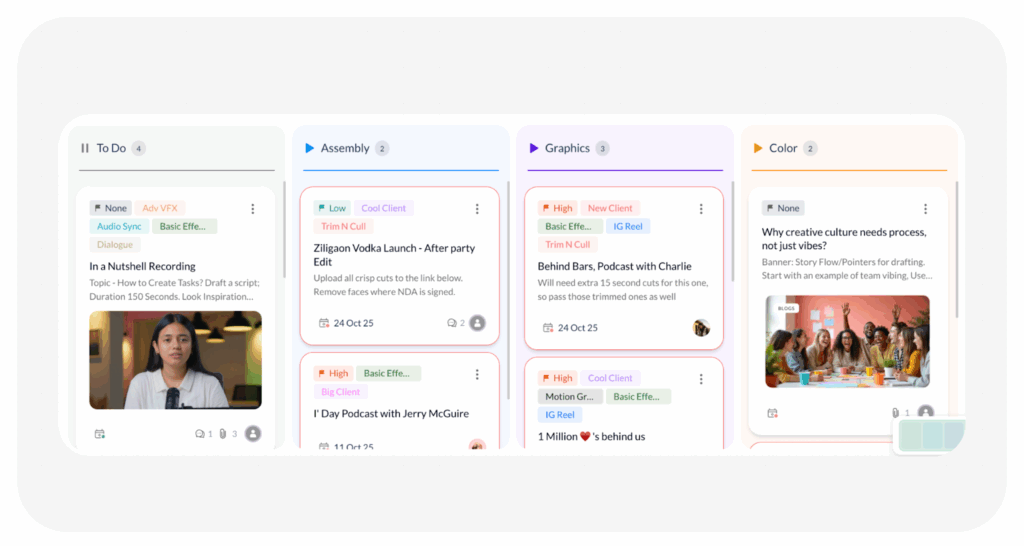
A Worklist in ButtonShift is a flexible project management tool designed to help you manage creative projects with style and stay in control of your work. It is much more than a simple to-do list; it is the agile framework that organizes and tracks your tasks, ensuring projects move smoothly from assignment to completion.
1. Core Function and Capabilities
A Worklist helps you proactively manage your creative projects, no matter how big or small. It’s an agile tool designed to fit different team workflows by providing a structured environment where you can:
- Create and Allocate Tasks: Easily generate tasks related to file feedback or general project steps.
- Assign Team Members: Clearly delegate responsibilities.
- Set Priorities: Define the urgency of tasks.
- Group Tasks: Group tasks into plans for complex projects.
- Engage in Discussion: You can simply create a Group Chat within the desired Worklist to engage in discussions about the project and keep all communication centralized.
- Control Flow: Worklists are widely available to workspace members, including the Approver, Creator, Reviewer, and Collaborator within entities such as Boards, Collections, Spaces.
- Permissions: Set worklist permissions with Full or Limited access for members within.
2. Status Categories and Workflow Setup
Worklists organize tasks into three fundamental status categories, providing instant visual clarity on project health. Multiple stages/statuses can be created but mapped to one of the following categories to properly define the beginning and ending of tasks.
- Not Started – For statuses that either mean the work is yet to start, or paused.
- In Progress – For statuses that indicate the task is in motion, but not yet completed..
- Completed – For statuses that mean the Task was either successfully completed or abandoned.
3. Advanced Management Tools
Worklists integrate powerful features to give you a true bird’s-eye view of your project status:
- Labels: You can add labels to tasks, which function as powerful filters to quickly sort, categorize, and review projects. Clicking on a label on the main Worklist page will display all associated tasks across every status.
- Worklist Insights: For users on Team Plans, this exclusive feature provides deep analytics on project health. Insights are broken down into:
- Overview: A summary of all tasks by Completed, Not Started, and In Progress status categories.
- Workload: Shows individual team members’ share of active tasks.
- Plan and Progress: Tracks the completion percentage of tasks within each plan and their categorisation.
By integrating task creation, labeling, group chat, and analytics, a Worklist ensures you have the structure to manage projects and the visibility to always know their status.
Last modified: December 8, 2025
