
Yes, you absolutely can enhance the configuration of an already purchased Pay-as-you-Go (PayG) board. This feature allows you to scale up limits for validity, storage, or member count if your project needs evolve. The cost is calculated instantly using a prorated adjustment.
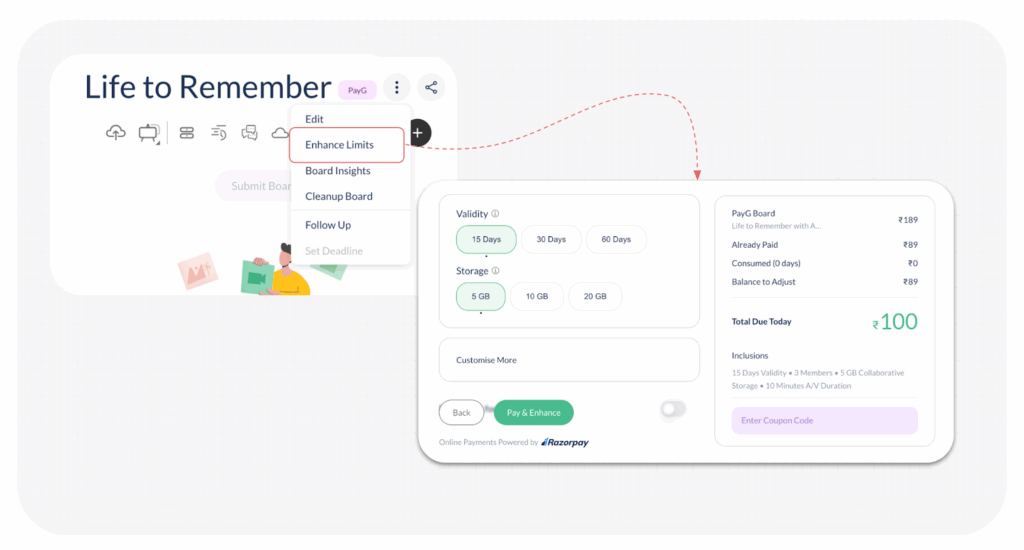
Step-by-Step Guide to Enhancing Limits
- Open the Board: Click open the desired PayG board from your workspace.
- Access Enhance Limits: Click on the 3 vertical dots next to the board name and select ‘Enhance Limits’.
- Select New Options: The Enhance Board Page will open with your current options auto-selected. You can choose to enhance any of the following:
- Validity (e.g., from 15 days to 30 or 60 days)
- Storage (e.g., from 5 GB to 10 or 20 GB)
- Allowing Downloads
- Allowing Audio/Video durations (e.g., from 0 Mins to 10, 20, 60, or 120 Mins)
- Member Count (e.g., from3 to 5, or 10)
- Review Prorated Billing: The right side of the page provides a precise breakdown of the adjustment, factoring in what you have already paid:
- New PayG Board Amount (A): The total cost of your newly selected, enhanced configuration.
- Already Paid Amount (B): The original amount paid for the board.
- Consumed Amount (C): The prorated amount consumed based on the days the board has been active.
- Balance to Adjust (D = B – C): Your credit balance from the original purchase.
- Total Due Today (A – D): The final amount required to activate the new configuration.
- The latest selected board options are also displayed under Inclusions.
- Pay and Activate: Click on Pay and Enhance at the bottom left. You can securely complete the payment using UPI, Cards, Netbanking, or Wallet.
The new enhanced limits and options will be activated immediately upon successful payment.
Visited 9 times, 1 visit(s) today
Was this article helpful?
YesNo
Last modified: December 10, 2025
