
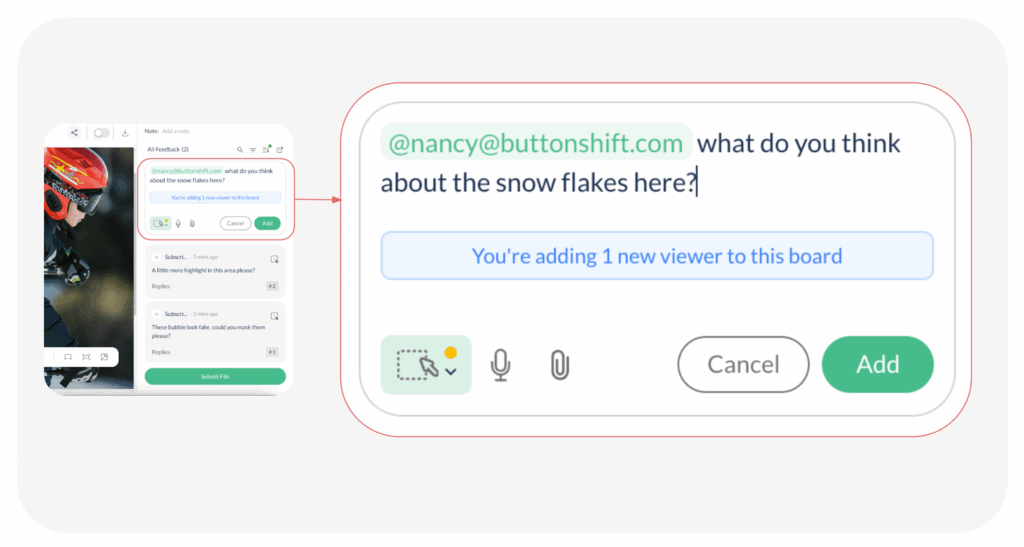
Seeing extra viewers on your file or board can be confusing, but it doesn’t indicate an issue with security. In ButtonShift, a user can gain Viewer access to your content through one primary mechanism that doesn’t involve you manually adding them as a member, but by being tagged in a comment.
How Users Gain Viewer Access
A user is automatically added as a Viewer when they are specifically brought into the conversation via the feedback tool. This can be done by any existing member (Creator or Approver) who has access to the file or board.
- Action: When a user with access tags someone using the @ symbol (e.g., @JaneSmith) in the comment section or feedback tool on your file or board, the system automatically grants the tagged person access.
- Purpose: This immediately provides the tagged individual with the necessary Viewer permission to see the content and respond to the specific feedback or question they were mentioned in.
The Limits of Viewer Access
It’s important to understand that gaining Viewer access this way is strictly for communication and observation. The added Viewer does not gain any control over the workflow.
- They can see the file/board and reply to comments.
- They cannot perform any control actions like approving, rejecting, uploading new files, or changing the file’s status.
Visited 10 times, 1 visit(s) today
Was this article helpful?
YesNo
Last modified: January 6, 2026
