
Labels are a powerful feature available in Worklists that act as customizable filters, allowing you to quickly sort and review tasks across your project. In simple terms, Labels are filters you create to categorise and group tasks visually.
Creating a Label
Labels are created and assigned from within an individual task:
- Open the Worklist: Click open the desired Worklist from your workspace.
- Open or Create a Task: Open an existing task under any status (e.g., To Do, In Progress) or Create a new task and click open it.
- Find the Label Option: Inside the task details, you will find an option named Label. Click on Add labels next to it.
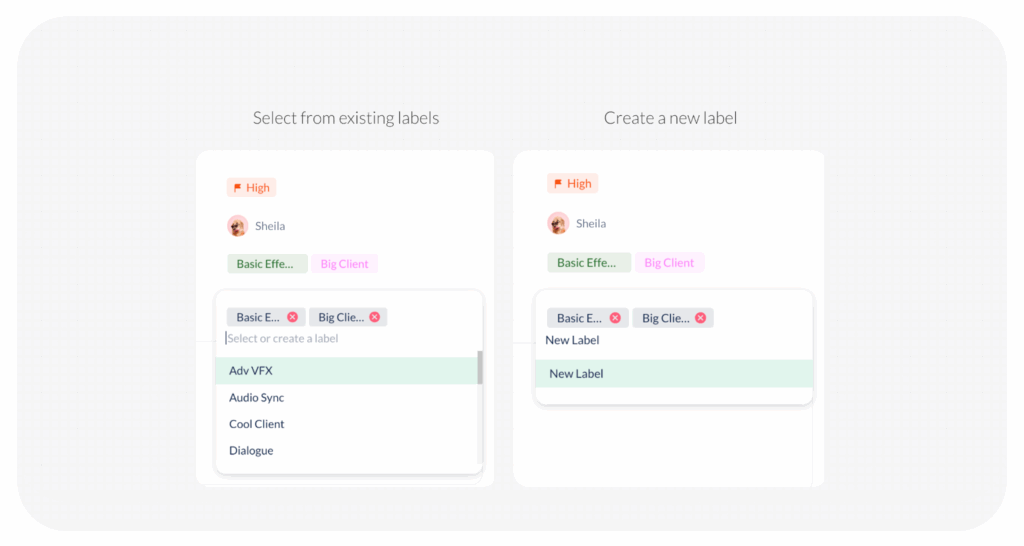
- Select or Create:
- You can select an already created label from the dropdown
- Or, you can create a new one by typing the name and pressing Enter
- Assign to Other Tasks: You can similarly create and assign the same labels for multiple tasks in the plan.
Visited 17 times, 1 visit(s) today
Was this article helpful?
YesNo
Last modified: January 10, 2026
